


 Loading...
Sync iPhone with Facebook Friends ( Contacts )
Thanks to the Facebook App, synching Facebook Friends with iPhone contacts couldn't be easier
- On your iPhone, go to the Apple App Store and Download the Facebook App
- Once installed, the Application should ask if you want your Facebook Friends to be synchronized with your iPhone Contacts
- That's it, you're all set
If things don't run all automatic, proceed as follows:
- In the Facebook App, tap "Friends"
- Then, tap "Sync" in your iPhone's top-right corner
- Turn on "Syncing"
- Finally, accept the agreement
Notes & possible issues
- Once you complete the above procedure, your iPhone will synchronize your Facebook Friends every time you connect your iPhone to your Computer
- This solution allows to sync Facebook contacts with iPhone 4 and iPhone 4S
Sync iPhone with Facebook Photos
What's great if you Import Facebook photos to iPhone is that you see your Friends' faces on your iPhone when they call you!
Plus, it's so simple, there's no reason to do without
Just follow our Guide to Sync Facebook Friends with iPhone Contacts and make sure the "Replace photos" option is switched on
Notes & possible issues
- Your Facebook Friend's Photos should be synched automatically every time you connect your iPhone to your Computer.
If not, follow the manual procedure described in Sync Facebook Friends with iPhone Contacts
Sync iPhone with Facebook Events
Tired of manually entering Facebook Events to your iPhone Calendar?
It's actually very easy to Synchronize iPhone Calendar with Facebook Events and Birthdays
Here you go:
- On your computer, login to Facebook and click Events in the left panel
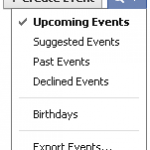
- Click the magnifier and select Export Events as shown below
- Copy the link that appears and send it to yourself by email
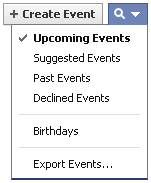
- Now, on your iPhone, go to the Mail app and copy the link
- Go to Settings -> Mail, Contacts, Calendars -> Add Account -> Other
- Tap Add Subscribed Calendar and paste the link into the Server address box
All set!
Your Facebook Events should now automatically sync to your iPhone Calendar

Mike Johnson
Founder and Editor of sync-iphone.com has a sincere desire to provide readers with honest and useful solutions for their iPhone
More about him on Google+





Is there a way to sync Facebook contacts with Gmail contacts or to merge them together ?
Try this ( you need both a Yahoo! and a Gmail account ):
– Login to Yahoo!
– Go to Contact -> Import email from Facebook
– Export Yahoo .csv and download it
– Login to Gmail
– Upload the .csv file to your Gmail Contacts
You’re all set!
My other contacts on iPhone are shown as a “big” photo when they call. While all Facebook friends are shown only as a small thumbnail. Is there any way around this?
Are we able to manually sync it as the contact names and Facebook name is different? How can we link it together? Thanks.
Dear Jinssz,
I’m not sure this answers your question, but you can try to add the real name as an “Alternate name” into Facebook:
Account -> Account Settings -> Change (Name) -> Enter an Alternate Name
Let me know if I missed the point
I guess what Jinssz needs is the situation when the friend’s name in Facebook is different from that in his/her Contact list.
Anyway to resolve this? Please advise.
Thanks.
Hi melaxela,
You are just right
A search in Facebook discussions boards reveals that, to sync Facebook contacts manually, your best bet is to delete the contacts that are spelled differently and recreate them
I have done all the above, but for some reason only some of my contacts are linked to their Facebook pic
I have tried changing the name in my contacts to the exact name on their FB profile…..not worked
I have tried copy and pasting the FB id into the url because that seems to be on the contacts with pics…. not worked
Any other suggestions?
Is there a way to sync I Phone notes with Facebook notes?
Thanks!
Dear Js,
I doubt this is possible
Just let us know if you find any solution
i am having the exact same problem…please anyone??
So my friend asked to borrow my iphone 4 the other day & “accidentally” synced my facebook friends with his facebook friends list. I think he may have synced my Yahoo Messenger contact list too. Is there any way I can reverse this? What can I do??? I think he’s a snitch!!!!
Dear AK,
There is unfortunately no way to “reverse” this
Your best bet is either to manually remove your friend’s friends or remove all friends and sync with yours again
Hi,
After sync facebook contacts, I am not able to see it in my address book.
Is there any thing that I am doing wrong…
Please suggest ..
Ashit
I am having the same prob…. Please help!
Hi guys,
You can try this
– Hold down a contact till the menu comes up
– Then, tap the contact link and at the top click Get Friends
It will say “Facebook” and you’ll be able to go through and select the people you want to add to your contacts list
As it should duplicate contacts in your list, you’ll have to go back through your contacts list and individually link each of them following the same procedure
Change the name of the contact to the name that they have on Facebook then re-sync. It should work. If they have a crazy name you don’t like then enter a nickname for them through your edit contacts option
I have the new iphone 4s. I have synced up my facebook friends with my contacts and everything went well, except when people call I no longer see a large picture of them that takes up the entire screen but I just get a very small one next to their name. Any suggestions to enlarge their pictures?
Dear Adam,
The only solution I’m aware of to solve this issue with the small Facebook contacts images is to:
– Open a contact
– Tap Edit
– Edit the photo (don’t Move or Scale it just click “Choose”)
This should maximize the photo to the edges of your screen
Is it suppose to be automatic? I’ve tried this twice, and it doesn’t show up in my contacts. Is there something I’m missing?
I have the Iphone 4. Just synced my facebook with my phone. However, only half my contacts with facebook had pics uploaded. How do I get the other half?
I’ve tried this and it still doesn’t work. It goes on like its loading but when i went to my contacts, they still were not there.
I got all of this right but I got like 3-4 contacts which won’t sync with Facebook despite their names being correct… Can anyone help me? If so, thank you in advance!
I am having a problem with the facebook sync. When I try to sync the contacts, it is not updating their information. It will update the pictures, but is not adding any of the other information that it is suppose to udpate such as the link to their fb profile and any other contact details. Any suggestions?
Is there a way to sync every contact on Facebook to your phone?
Dear Matt,
If you follow the instructions on the current page, this is what should happen
I did what you told me and for some contact, just a blue screen appears. I’m using an iPhone 4S and redid the actions multiple times, every time with the same result…
Dear Michiel,
If this blue screen appears on your computer, you’d better reinstall your computer altogether
Don’t forget to backup your data first
I had to log out and then back on FB on my phone for it to work.
Try to keep the email address of the contacts in your address book
as the same with the friends in Facebook.
Sync it again,
then you will see the photos and not need to change the names of the contacts to be the same in Facebook.
My friend got an iphone 4s and I was wondering is there a way to be able to link your facebook calendar onto your iphone calendar??
Help would be greatly appreciated
Thank you
Dear Ana,
To answer your question, we’ve just added a section to the current post
Very helpful post! Thank you!
Any way to delete a Facebook calendar entry from iCal?
What happened to this feature with the new FB IOS release?
when i downloded Facebook on my phone it did not give me the option to sync.
i tried clicking friends then on the right clicking that ( that is where i believe sync friends is suppose to be) it only gives me the find friends option
what am i doing wrong
I just got the iPhone 4S from Verizon, and I am trying to sync Facebook friends with contacts. I followed all of the directions, and I was neither prompted to sync the contacts when I signed into facebook nor is there a “sync” option in the top right corner when in friends window. What do I do? I have deleted facebook and redownloaded it several times and that doesn’t work. Are there certain settings I may need to change beforehand?
Ok this is driving me crazy. Somehow my friends on facebook are now in my iphone..Grrr I don’t want this…found out how to fix it but can seem to find the sync button by clicking on the friends icon…where th heck is it?
I am using I phone 3G, IOS 4.2.1, One month ago I was able use smart sync application on my I phone 3G. But one day this application was deleted accidentally form my phone. After that I have tried several times to re-install smart Sync to my I Phone 3G but remain failed because it’s asking or IOS 4.3 and my phone update any more. But I really want to use this application.Is there any compatible version of Smart Sync for I phone 3G, IOS 4.2.1
Please suggest.
I have tried to sync my Facebook friends to my phone contacts and when I hit the icon in the top right corner it only says find friends or cancel…there is no sync option. Any suggestions?
How do I UNsync my facebook friends from my iPhone contacts?
I Have Done All the possible Measures to Sync my Facebook Contacts to my ipnone 4s but not able to do that …. i tap the friends button in the option column and then the right top corner their it is asking me to find friends not to Sync contact…. plz guide me how it can be done i have downloaded the latest app of FB which ws already given in I Pnone
So syncing my fb has caused almost all my contacts to duplicate in my address book. How can I undo this? I deactivated my fb but all the dups are still in my contacts…..help!
I want to REVERSE the sync I made with my contacts and facebook on my phone. I don’t want all this facebook info connected to my contacts. Can’t I get out of this connection?
I play castle age so I have many friends not in my contact list on my phone. I only want my contacts to link with Facebook. I know android phones can do this, so iPhone must be able to as well but I can’t find it.
At one time this worked great on my iphone 5. Now it will not bring all of my FB friends up to sync with my iphone 5. I’ve contacted tech support with T Mobile and Apple. They both say it’s a problem with the Facebook App. Any suggestions???
Every time I try to sync I get the error message: The operation couldn’t be completed. (FBAPIErrorDomain error 9.)
will all my photos on my iphone 4 completely sync to facebbok app?
I’m trying to unlink my iPhone 6 plus with facebook.. any help?
I noticed that my photos from my iphone are not being synced to my facebook anymore. My setting is set to “Photo Syncing”, but haven’t had any syncing since the middle of February. My Storage total has 2.0 GB and Used is at 70%. I really like having it synced to Facebook, so I would appreciate helping me with my issue. Thank you!
When I use the “find friends” section and attempt to search “contacts” using the iPhone app, I get a messge that says “The operation couldn’t be completed. (FBAPIErrorDomain error 9.) Any ideas on what the issue is?